(On Sale) Logitech MK270 Review: Is This Wireless Combo Worth It?
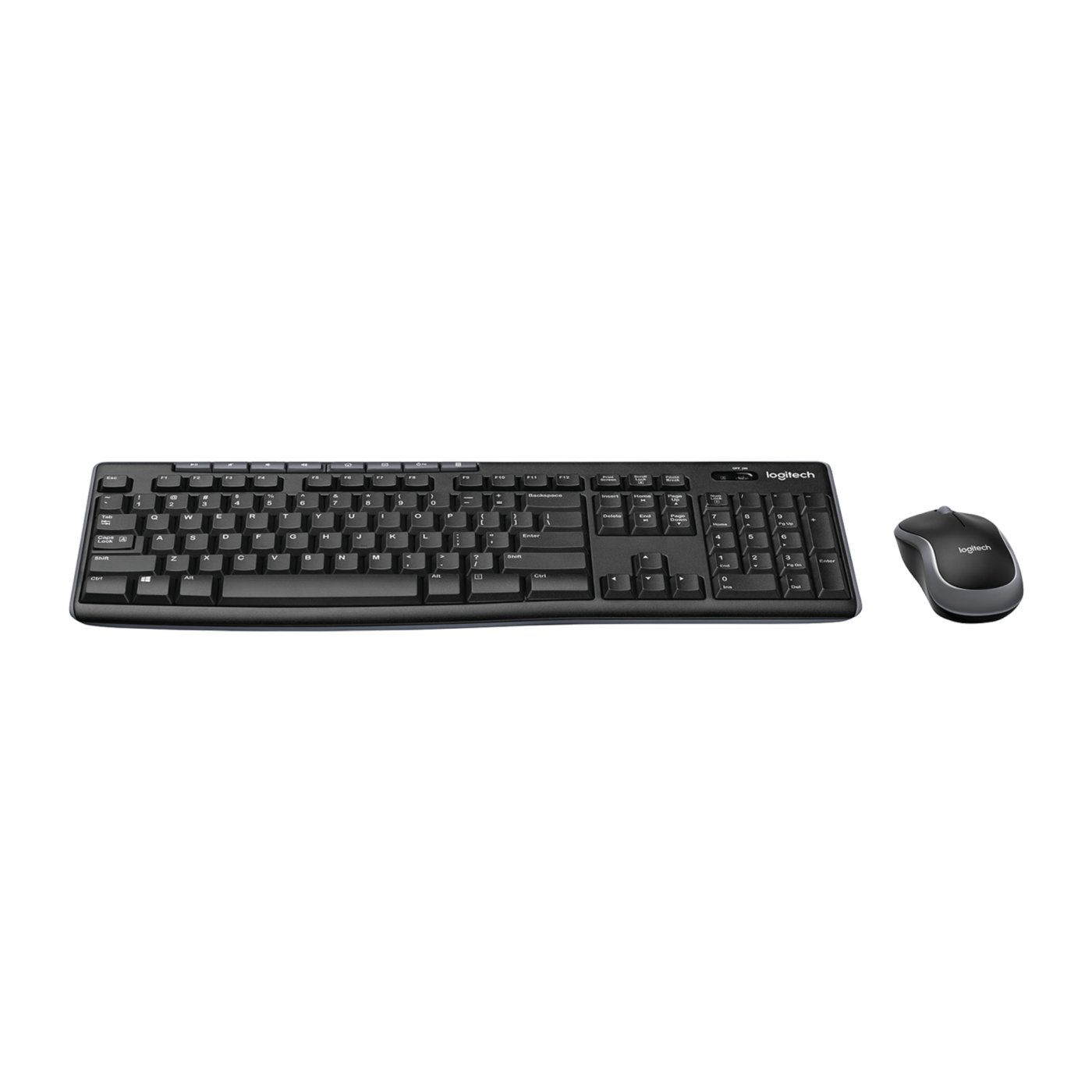
Logitech's MK270 combines a full-size wireless keyboard with a compact mouse, using one USB receiver for both devices. It offers media shortcuts, a spill-resistant keyboard, and long manufacturer-rated battery life, but lacks ergonomic extras and USB-C connectivity.
Amazon prices change often, so we link you straight to the live price instead of quoting one here.
As an Amazon Associate I earn from qualifying purchases. Disclosure
What we liked
- Full-size keyboard with a number pad and eight media controls
- Spill-resistant keyboard with adjustable tilt legs
- One USB receiver connects both the keyboard and mouse
- Manufacturer-rated battery life of up to 36 months for the keyboard and 12 months for the mouse
- Wireless range of up to 33 ft under suitable conditions
- Compact, ambidextrous mouse design
The catch
- USB-A receiver may require an adapter for USB-C-only laptops
- No dedicated ergonomic palm rest
- Compact mouse may feel small for some users
- No built-in Bluetooth or easy switching between multiple computers
- Limited advanced customization compared with higher-end combos
Pros, cons and our rating are Dealmynt's own editorial verdict — not customer ratings from any retailer.
Our full review
TL;DR: The Logitech MK270 Wireless Combo is a straightforward wireless keyboard and mouse set for home offices, students, and everyday computer use. It offers a full-size keyboard, a compact mouse, convenient media shortcuts, and long manufacturer-rated battery life. However, it uses a USB-A receiver, lacks advanced customization, and may not provide the comfort features some users need for extended typing sessions.
Why It Is on Our Radar
The Logitech MK270 is a practical option for anyone who needs a reliable keyboard and mouse without spending extra on premium features. Its full-size layout, dedicated number pad, and shared wireless receiver make it suitable for everyday tasks, from working on spreadsheets to browsing the web and managing documents.
Rather than focusing on flashy features, this combo prioritizes simplicity. It is designed for users who want a familiar keyboard layout and a compact mouse that work together through a single USB receiver.
What You Get
The MK270 includes a full-size wireless keyboard with a number pad, arrow keys, function keys, and eight multimedia hotkeys for common tasks such as controlling volume, playing or pausing media, and navigating the web. Its low-profile keys provide a traditional typing experience, while adjustable tilt legs let you change the keyboard angle.
The keyboard is designed to resist accidental spills, although it is not waterproof and should never be submerged in liquid.
The included wireless mouse has a compact, ambidextrous design intended to accommodate both left- and right-handed users. Its small size makes it easy to carry and convenient for desks with limited space, although users with larger hands may prefer a full-size mouse.
Both devices connect through one USB-A nano receiver, reducing the number of occupied USB ports. Logitech advertises a wireless range of up to 33 feet, although actual performance can vary depending on your surroundings and potential wireless interference.
Battery life is another key selling point. Logitech rates the keyboard for up to 36 months and the mouse for up to 12 months, depending on usage and operating conditions. These are manufacturer estimates rather than guaranteed results.
The Catch
The MK270 keeps things simple, but that also means fewer features than more advanced keyboard and mouse combos.
First, connectivity may be an issue with newer laptops. The included receiver uses USB-A, so computers equipped exclusively with USB-C ports will need a compatible adapter. The combo does not offer built-in Bluetooth, which also limits its flexibility if you frequently switch between multiple computers.
Comfort is another consideration. The keyboard does not include a dedicated ergonomic palm rest, and its traditional layout may not be ideal for people who type for several hours every day. The compact mouse can also feel small during extended use, particularly for people with larger hands.
Customization is limited compared with premium Logitech products. If you want extensive programmable controls, advanced software features, or a more ergonomic design, a higher-end model may be a better fit.
Finally, the keyboard's spill-resistant construction provides some protection against accidental splashes, but it should not be treated as a fully waterproof device.
Who Should Buy It
The Logitech MK270 is worth considering if you want an affordable, straightforward wireless keyboard and mouse for everyday computing.
It may be a good fit for:
Students who need a full-size keyboard for assignments and research.
Remote workers setting up a basic home office.
Families sharing a desktop computer.
Users who regularly work with spreadsheets and benefit from a dedicated number pad.
Anyone who prefers a simple wireless setup without complicated pairing procedures.
If your computer has an available USB-A port and you do not need advanced features, the MK270 covers the essentials without adding unnecessary complexity.
Who Should Skip It
Consider other options if you spend long hours typing and need a more ergonomic keyboard, a dedicated wrist rest, or a mouse designed for a specific grip.
You may also want to look elsewhere if your laptop only has USB-C ports and you prefer not to use an adapter, or if you need Bluetooth connectivity and easy switching between multiple devices.
Users who want programmable buttons, extensive customization, or a larger mouse may be better served by a more feature-rich combo.
Bottom Line
The Logitech MK270 Wireless Combo focuses on the essentials: a full-size keyboard, a compact wireless mouse, convenient multimedia shortcuts, and long manufacturer-rated battery life. Its shared USB receiver makes setup straightforward, making it a practical choice for home offices, students, and everyday desktop use.
Its main trade-offs are the USB-A connection, limited customization, and lack of dedicated ergonomic features. The compact mouse may also be uncomfortable for some users during extended sessions.
Our recommendation: Consider the MK270 if you need a simple wireless keyboard and mouse for everyday tasks. Before purchasing, check your computer's available ports, consider whether the mouse size suits your needs, and compare the current price with other options. Use the retailer's current listing to confirm availability and pricing before making your decision.
Ready to buy the Logitech MK270 Review: Is This Wireless Combo Worth It??
Check price on AmazonAs an Amazon Associate I earn from qualifying purchases. Disclosure
You might also like
Logitech ERGO M575S Review: Is a Trackball Worth It?
The Logitech ERGO M575S is a wireless trackball designed to save desk space and reduce the need to move your arm while working. It offers quiet clicks, Bluetooth and Logi Bolt connectivity, and long battery life. The main trade-offs are its learning curve, right-handed design, and replaceable AA battery.